Almost every Hulu problem in 2026 comes down to one of four things: your network cannot hold the stream, the Hulu app on that device has gone stale, Hulu’s servers are having a bad half hour, or your account has an issue — billing, device list or location. The fixes below run cheapest and most likely first. Start with the quick diagnosis table and check whether Hulu is down before you reinstall anything.
Nowadays, Online video websites are more and more popular. People can watch videos everywhere and anytime. That is why the online video website becomes popular, compared with the television. One of the most popular online websites is Hulu, which has grown into one of the biggest streaming services in the US.
While watching videos on Hulu, sometimes an error occurs and it stops the video. For instance, this can be quite irritating if a video gets stopped after every 5 seconds for buffering. There are many more errors that occurred on Hulu while people watching movies and other videos. So, below, we are going to discuss some common streaming issues and problems you may experience on Hulu. As well, you will find their solutions here.
Hulu is no longer an independent service. Disney completed its buyout of Comcast’s remaining stake in 2025 and is folding Hulu into Disney+ through 2026, which is why the app, the sign-in screen and the device list have all been shifting: eligible subscribers can sign in with a MyDisney account, Hulu content now appears inside Disney+, and a few older devices have lost the app altogether. None of that changes how you fix a playback failure — your plan, price and login carry over — but it does explain why menus, billing screens and device support may not look the way you remember. The full picture is in Where Hulu Stands in 2026 below.
Quick Diagnosis: Symptom, Likely Cause, Fix
| Symptom | Likely cause | Jump to |
|---|---|---|
| Video stops every few seconds to buffer | Bandwidth below Hulu’s recommendation, or too many devices sharing it | Fix 2, Fix 4 |
| “Playback failure” with no reason given | Device cannot hold a session with Hulu’s servers, or stale app data | Fix 3 |
| Loading spinner that never finishes | Router, DNS or weak Wi-Fi signal | Fix 4, Fix 5 |
| An error code on screen (RUNUNK13, P-DEV320, 5003) | App, DRM or Hulu-side fault | Error code table, Fix 11 |
| Error 500, 502 or 504 in a browser | Server-side HTTP error, or a local cache problem | Fix 6, Fix 7, Fix 8 |
| Works on your phone, fails on the TV | Device app cache or an outdated operating system | Fix 10, Fix 11 |
| “Too many devices”, or live channels missing | Stream limit or Home Location mismatch | Fix 13 |
Hulu Error Codes and What They Actually Mean
| Code | What it usually means | Fastest action |
|---|---|---|
| RUNUNK13 | Generic playback failure; corrupted app data or dropped connection | Force close, clear cache, reinstall |
| P-DEV320 | Hulu cannot reach its servers, or data arrived incomplete | Restart device and router, reinstall |
| P-DEV302 | Unstable connection, packet loss, weak Wi-Fi | Restart the modem, try wired |
| P-DEV318 | Device-level fault or an app that is behind | Update the app and device OS |
| 5003 | Playback or DRM license verification failure | Update the OS, reinstall Hulu |
| DRM-1 / DRM-3 | Digital rights management failure | Update browser and OS, disable conflicting extensions |
| BYA-403-007 | Hulu blocked playback — VPN, proxy or smart DNS most often; sometimes billing | Turn off the VPN, check payment method |
| 16 | Invalid region code | Fix 12, Fix 13 |
| 500 / 503 | Server error on Hulu’s side | Fix 1, Fix 6 |
Where Hulu Stands in 2026: Sign-In, Billing and Devices
Disney announced on August 6, 2025 that it would fully integrate Hulu into Disney+ during 2026. Hulu replaced Star as Disney+’s international general-entertainment brand on October 8, 2025, and from May 19, 2026 eligible subscribers could sign in to Disney+ with their MyDisney account and import Hulu watch history and watchlists. Despite the headlines, Disney said in May 2026 that it has no current plans to shut down the standalone Hulu app: subscriptions, the app and Hulu.com still work, and your plan, price and login carry over. Hulu + Live TV and add-ons remain in the Hulu app.
Billing. Disney announced a US price increase on September 23, 2026: Hulu (With Ads) to about $12.49 a month and Hulu Premium (No Ads) to about $21.49, with existing subscribers moving to the new rate on their first bill on or after October 21, 2026. Hulu + Live TV is listed at around $99.99 with ads and $109.99 ad-free. Hulu’s own help pages still showed $11.99 and $18.99 when checked, so verify your own Account page.
Devices. Support is shrinking slowly. Nintendo Switch is the confirmed casualty: the app left the eShop on November 6, 2025 and support ended on February 5, 2026. Roku needs OS 11 or higher. Hulu otherwise lists Android and Apple phones and tablets, Apple TV (4th generation or later), Fire TV and Fire tablets, Chromecast, Echo Show, Xbox One and Series X|S, select LG, Samsung and Roku models, and Mac or PC browsers.
Following are the errors that occur while watching videos on Hulu:
Fix 1: Check Whether Hulu Is Down Before You Touch Anything
This is free and takes thirty seconds, so do it first. If the fault is Hulu’s, nothing you do locally will fix it faster.
- Check help.hulu.com for service notices and known-issue articles.
- Check @hulu_support on X, where support posts acknowledgements and recovery updates.
- Try a second device and, if you can, a second network. Failing everywhere points at your network or at Hulu.
- Outage trackers such as Downdetector show spikes early — a signal, not confirmation.
During an outage, wait 15 to 30 minutes between attempts and leave your account settings alone.
Fix 2: Test Your Connection Against Hulu’s Speed Requirements
Hulu’s published numbers are per stream, measured on the device that is playing — not the headline speed of your plan.
| What you are watching | Sustained download speed Hulu recommends |
|---|---|
| Hulu streaming library | 3.0 Mbps |
| Live streams | 8.0 Mbps |
| 4K content | 16.0 Mbps |
| Reduced-quality fallback | 1.5 Mbps may still play |
A 100 Mbps plan means nothing if the TV is two rooms from the router and holding 4 Mbps. Cloud backups, game downloads and other people in the house all eat into the same connection.
Fix 3: Hulu Playback Failure

This is the most common problem that occurs while watching Hulu and most of the time it won’t tell you the reason for this problem. Usually, this error occurs when your device is not able to connect to the Hulu server or the servers are not able to provide a connection for streaming video.
This error might occur because of software and home connection etc. If there is no issue at your end, this error occurs because of a problem at Hulu’s end. For this kind of error, you can check your internet connection, restart your device, and try to switch it to a wired connection and if it still doesn’t work, delete or reset the Hulu application and then it might start working.
Try the cheap steps before deleting anything: sign out and back in, then clear the app cache (Fix 9 and Fix 10). Playback failures usually carry a code — RUNUNK13, P-DEV320, 5003 or BYA-403-007. Note it before you restart anything.
Fix 4: Hulu Load Error
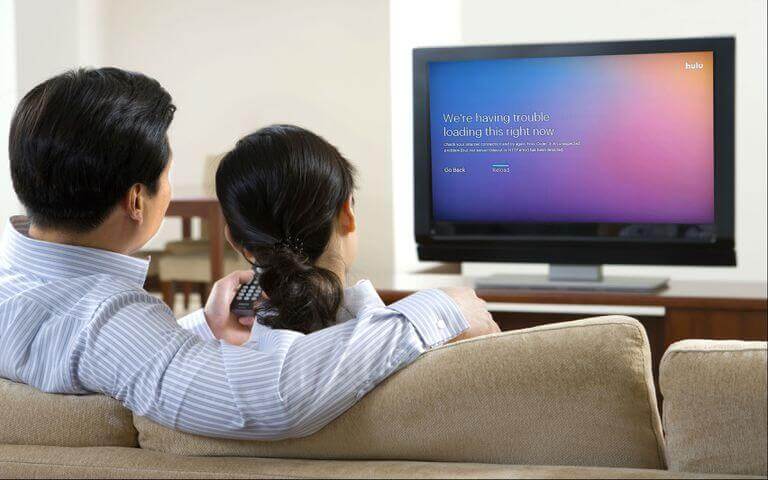
This error happens because of internet connectivity issues. Your video keeps buffering or loading. For this error, you need to check your internet settings or router. Disconnect all the other devices from the network and play Hulu, it might work properly and your video won’t stop continuously.
That is still the right first move. Power-cycle the modem first, then the router: unplug both, wait 30 seconds, plug the modem in and let it come fully online, then the router. That clears the stale DHCP leases and NAT tables behind most endless loading. If Hulu loads in a browser but not in the app, the network is fine — go to Fix 11.
Fix 5: Hulu Streaming Error

The streaming error can also occur again with any issue related to the network. Maybe your device is not connected properly or facing weak signals. For this error, you can restart your internet device, connect your device with the internet, and then start the watching video. It works most of the time.
It does, because a restart re-runs DHCP and rebuilds the route to Hulu’s servers. Do it properly: unplug the streaming device for 30 to 60 seconds, then modem, then router. If a restart only buys a few minutes, suspect signal strength or DNS — move closer to the router, use the 5 GHz band, or let the router assign DNS automatically.
Fix 6: Hulu Error Code 500

This is a very common error that occurs because of the web page error and weak internet signals. You can’t fix this error completely, well you can try refreshing the page. But before refreshing, check your internet connection if it needs, you can restart it as well.
Error 500 is not a Hulu-specific code — it is the standard HTTP status for “internal server error”, passed through by Hulu’s web player, so refreshing or waiting is often the honest answer. It is still worth trying locally first: many browser 500s clear if you clear Hulu’s cookies and cache, disable ad-blocking extensions, or retry in a private window. Do not confuse 500 with 5003, which is a real Hulu DRM playback code fixed by updating the OS and reinstalling.
Fix 7: Hulu Error Code 502
Error code 502 appears because of bad Gateway, and it’s not your fault. This error is an HTTP status, which means an invalid response to your server from another server. You can watch the same video on any other browser by opening again that video there.
That is accurate and still the practical advice: a server in the chain returned something invalid, and nothing on your device caused it. Add one option to “any other browser” in 2026 — the Hulu app on another device, or Disney+ if your subscription covers the title, since the two services now share infrastructure.
Fix 8: Hulu Error Code 504
Error code 504 appears when your video doesn’t respond for a long period of time. Generally, it is timed out an error that the server is not responding to your command and it occurs because of connectivity issues. The server won’t respond to your command if it’s not getting the required signal strength. You can’t fix this error also. The only thing you can do to rectify this error is to reload the web page or put the request of the same web page on another tab of the browser and check your network as well. Restart it and see if it works or not.
The one part worth softening is “you can’t fix this error also”. A 504 is a gateway timeout, and while the timeout is server-side, the trigger on your side is often a connection too slow or too unstable to finish the request in time. If reloading does not help, work through Fix 2 and Fix 5 before blaming Hulu.
Fix 9: Sign Out and Remove Devices You No Longer Use
Stale sessions cause more playback and login errors than people expect, and clearing them costs nothing.
- In the Hulu app on a TV, open your profile or account icon and choose Log Out.
- Remotely, sign in at Hulu.com, open Account, find Watch Hulu on Your Devices and select Manage Devices, then Remove next to anything unfamiliar. Older guides call this Privacy and Settings; the on-page label is what matters.
- To clear everything, sign in at my.disney.com, open Access and Security and use Log out of everywhere — Hulu notes this can take up to four hours.
- If you removed something you did not recognise, change your password too.
Fix 10: Clear the Hulu App Cache on Android TV, Fire TV, Roku and Apple TV
Clearing cached data removes corrupted files and stale sign-in tokens without touching your account.
- Android TV / Google TV: Settings > Apps > Hulu > Clear cache, then Clear data.
- Fire TV: Settings > Applications > Manage Installed Applications > Hulu > Clear cache, then Clear data.
- Roku: no cache control. Highlight Hulu, press the star button, Remove channel, then Settings > System > System restart, and add Hulu back from the Channel Store. Removing and re-adding is the cache clear.
- Apple TV: no cache option either — delete and reinstall the app.
On Roku, also check your profile names: names containing emoji or unusual characters have been reported to put the app into a persistent network error loop. Rename them at Hulu.com under Account > Manage Profiles.
Fix 11: Update or Reinstall the Hulu App
- Install any pending Hulu update from your device’s app store, then relaunch.
- Update the device too: Fire OS, Roku OS, tvOS, Android TV and console firmware. Hulu requires Roku OS 11 or higher, and error 5003 is usually a mismatch between the app and the device OS.
- If updating is not enough, uninstall Hulu, restart, reinstall and sign in. That refreshes DRM certificates, which is why it fixes 5003 and protected-content errors.
- Check the device is still supported. Where Hulu has retired the app — as on Nintendo Switch on February 5, 2026 — no reinstall will help.
Fix 12: Turn Off Your VPN, Proxy or Smart DNS
Hulu blocks VPN and proxy traffic at the network level, inspecting connection metadata rather than your physical address, so even a US-based VPN exit node is blocked. The usual result is a location error or BYA-403-007.
- Disable the VPN on the device, and at the router if that is where it runs.
- Turn off smart DNS and any privacy relay in your browser or router.
- If you need the VPN for other traffic, use split tunnelling and route Hulu outside the tunnel.
Hulu remains US-only, so travelling abroad stops playback even with a valid subscription.
Fix 13: Fix Location Errors, Home Location and Too-Many-Streams Messages
These are account rules rather than faults, and they explain most “it worked last week” complaints.
- Too many streams. Standard plans allow two screens at a time, as does Hulu + Live TV. The Unlimited Screens add-on gives unlimited screens at home and three on the go. Downloads do not count, but a browser tab does.
- Who holds your slots. A TV left on a live channel still counts. Close Hulu properly and remove devices you no longer use (Fix 9).
- Home Location. Hulu + Live TV is tied to a home network set from a residential, non-mobile connection; a hotspot does not qualify, and Hulu limits how often you can change it. A new IP or router can reclassify an in-home stream as out-of-home.
- Region errors. Codes 16 and BYA-403-007 usually mean the location check failed.
Fix 14: Check Billing, Payment Method and Plan Status
Playback stops just as effectively from a failed payment as from a broken network. Sign in and check the Account page for a past-due notice, an expired card, or a plan that was paused or changed. If you subscribed through Apple, Amazon or Roku rather than directly, the billing lives with that company — updating at Hulu.com will not stop an App Store or Amazon charge. Billing problems can surface as BYA-403-007, so if you see that code and are not running a VPN, check the card before reinstalling anything.
Συχνές ερωτήσεις
1. Is Hulu shutting down in 2026?
No. Disney is folding Hulu into Disney+ through 2026, but said in May 2026 that it has no current plans to shut down the standalone app. Plans, prices and logins carry over, and Hulu + Live TV still runs in the Hulu app.
2. Why does my Hulu video stop every 5 seconds for buffering?
Either the device is getting less than Hulu recommends — 3.0 Mbps on demand, 8.0 Mbps for live streams, 16.0 Mbps for 4K — or too many devices share the connection. Test on the failing device, disconnect the others, and try wired.
3. What do Hulu error codes RUNUNK13 and BYA-403-007 mean?
RUNUNK13 is a generic playback failure, usually corrupted app data or a dropped connection. BYA-403-007 means Hulu blocked playback, most often because of a VPN or proxy, and sometimes because of a billing problem.
4. How many devices can watch Hulu at once?
Two screens at a time on standard plans and on Hulu + Live TV. The Unlimited Screens add-on raises that to unlimited screens at home and three on the go.
5. How do I sign out of Hulu on a TV I no longer have?
Sign in at Hulu.com, open Account, go to Watch Hulu on Your Devices and select Manage Devices, then Remove next to that device. Log out of everywhere at my.disney.com under Access and Security clears all of them.
Σύναψη
Work the fixes in order and Hulu almost always comes back: check whether Hulu is down, test your connection against 3.0, 8.0 and 16.0 Mbps, restart the modem and the device, then move through cache, updates and reinstall before touching anything account-level. That sequence costs nothing and covers the playback failures, load errors and streaming errors above, as well as the HTTP 500, 502 and 504 responses you see in a browser.
The errors mentioned above and their solutions will surely help you to enjoy smooth streaming at Hulu.
Two things have changed since this guide was published. Hulu now shows a specific code with most playback problems — RUNUNK13, P-DEV320, 5003, BYA-403-007 — so note it before you restart anything, because it tells you whether you are dealing with your device, your network, your billing or Hulu’s servers. And Hulu is now part of Disney’s integrated setup: you sign in with a MyDisney account, eligible Hulu content plays inside Disney+, and device support is being retired slowly. If a fix here does not match your screen, check help.hulu.com or ask @hulu_support — the app underneath these instructions is still moving.
Πόσο χρήσιμη ήταν αυτή η ανάρτηση;
Κάντε κλικ σε ένα αστέρι για να το αξιολογήσετε!
Μέση βαθμολογία / 5. Καταμέτρηση ψήφων: